
Blumgi Rocket Unblocked — Play Free Online
More Runners and Platformers games


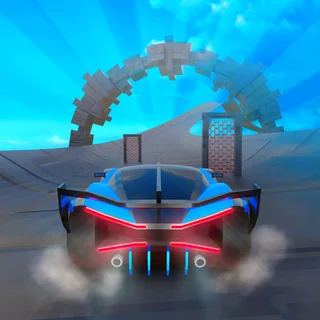
Blumgi Rocket unblocked: play Blumgi Rocket online free right here in your browser — no download, no sign-up, works on a school Chromebook.
Blumgi Rocket is a high-speed physics platformer where you pilot a miniature car equipped with a powerful rocket thruster. Instead of relying purely on conventional steering and wheel traction, your primary tool for navigating each obstacle course is explosive propulsion. Firing your thrusters launches the vehicle high into the air, turning hazardous gaps, towering cliffs, and loop-de-loops into aerial stunt opportunities.
The pace is energetic and immediate. Each stage presents a distinct bite-sized puzzle, challenging you to find the right balance between grounded acceleration and airborne trajectory. When you are taking a break between long shifts at Papa's Freezeria, Blumgi Rocket serves as an exhilarating change of pace, swapping careful sundae assembly for split-second reflexes and airborne maneuvers.
How to play
Navigating the courses requires managing both standard movement and rocket propulsion:
- Drive forward and reverse: Use the A and D keys or the Left and Right Arrow keys to roll along the terrain.
- Rocket boost: Hold the Spacebar, W, or the Up Arrow key to ignite your rocket engine and shoot into the sky.
- Touch controls: On touchscreens, tap and hold the screen to charge your drive and tap the boost button to launch.
- Quick restart: Press the on-screen reset icon or R if your car flips upside down or falls into a pit.
Your goal in every stage is simple: guide the car safely to the checkered finish line. Along the way, you will encounter bouncy pads, steep ramps, moving hazards, and narrow tunnels that test your timing.
Tips for clearing tough stages
Mastering the rocket engine takes a feel for momentum. Keep these strategies in mind:
- Feather the rocket engine: Holding the boost button constantly often sends your vehicle spinning out of control. Use short, controlled taps in mid-air to adjust your flight path and make soft landings.
- Level your wheels before landing: Hitting steep ramps upside down will cause you to bounce backward or crash. Use brief bursts of reverse or forward drive while airborne to rotate your chassis parallel to the ground.
- Use ramps for extra momentum: Combine a downhill roll with a boost just as you leave the lip of a ramp to gain massive upward lift and clear extended hazard pits.
- Embrace instant restarts: Because respawns happen in a fraction of a second, do not hesitate to experiment with alternate flight trajectories if a level seems impassable.
More games on Papa's Freezeria
If you enjoy Blumgi Rocket, there are plenty of other titles on the site to explore. When you want to return to restaurant management and multitasking, try your hand at Papa's Burgeria or Papa's Cheeseria to perfect your kitchen timing. If you prefer another quick arcade distraction, check out Cook House or My Super Tiny Market for casual, fast-moving gameplay.
Questions about Blumgi Rocket
Is Blumgi Rocket unblocked at school?
Blumgi Rocket runs in an ordinary browser tab from papasfreezeria.me, with nothing to download or install, so it plays on most school Chromebooks and work computers. If a network filter blocks the site, only that network's administrator can change it.
What are the controls for Blumgi Rocket?
Drive using the A and D keys or the Left and Right arrows. Press and hold the Spacebar, W key, or Up arrow to fire your rocket thrusters and launch into the air.
Can you play Blumgi Rocket on mobile devices?
Yes. On smartphones and tablets, you can control the rocket car using intuitive on-screen touch gestures to drive and activate boosts.
How do you unlock new vehicles in the game?
You unlock new vehicle designs and character skins automatically by clearing stages and reaching level milestones throughout your playthrough.
Does Blumgi Rocket save your level progress?
Your level progression and unlocked skins are saved locally in your web browser cache, so you can pick up where you left off upon returning.
More games
 Johnny Trigger Action Shooter
 Papa's Burgeria
 Papa's Pizzeria
 Papa's Cheeseria
 Papa's Hotdoggeria
 Cook House
 Cooking Fast: Halloween
 Kate's Cooking Party
 Vortelli's Pizza
 Cat Pizza
 Cat Coffee Shop
 My Super Tiny Market
 Monkey Mart
 Merge Cakes
 Jelly Fruit Merge
 Bad Ice Cream
 Bad Ice Cream 2
 Bloxorz
 Elastic Face
 Ludo Hero
 Block the Pig
 Where's My Pizza
 Highway Traffic
 Stunt Simulator Multiplayer
 Eggy Car
 Flying Car Simulator
 Drive Mad